Who it is for
- SEO specialists who check titles, descriptions, headings and canonical tags and need to show them to a client who does not open the code.
- UX and design reviewers who collect layout, contrast and copy problems across several pages.
- Agencies and freelancers who send an audit as a sales step or as the first deliverable of a project.
Website audit report template
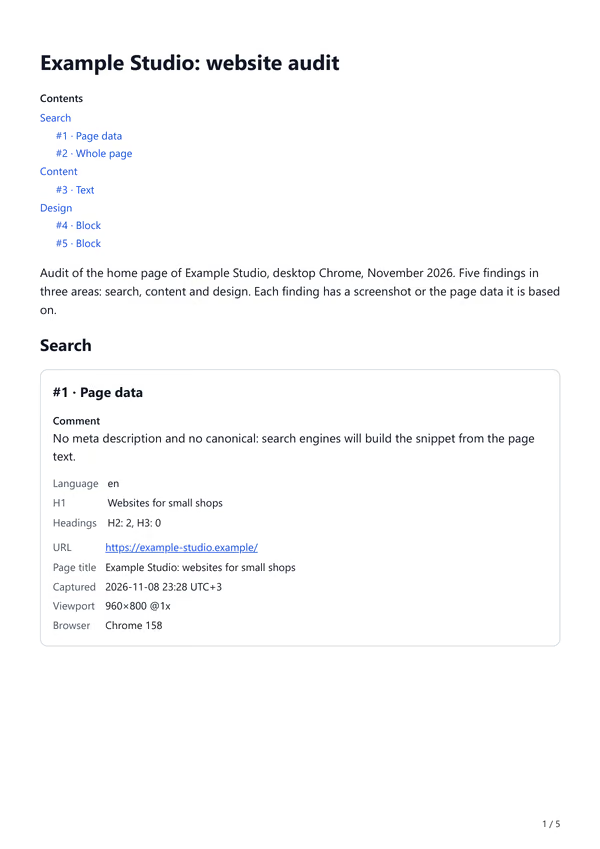
Copy the structure into a document or into SiteAnnotation: the title and introduction go into the report fields, each area becomes a section, each finding is one captured item.
Title: <site name>: website audit

Introduction
What was checked: <pages, device, browser>, <month and year>.
How many findings, in which areas, and the three to fix first.

Section: Search
#1 Page data: title, description, canonical, headings. Finding and fix.
#2 Whole page screenshot: structure, missing blocks. Finding and fix.

Section: Content
#3 Text quote: typo, unclear promise, missing fact. Finding and fix.

Section: Design
#4 Block: contrast, size, state. Selector and CSS rule to change.
#5 Block or area: layout problem. What it should look like.

Conclusion
First: <the fixes that bring the most>.
Next: <everything else, in order>.
How to write a finding
Each item answers three questions in the comment under it:
- What is wrong, in one sentence a client understands: "The main button is white text on light yellow".
- Why it matters: the number or rule behind it, such as "contrast 1.5:1, WCAG AA needs 4.5:1", or "search engines will build the snippet from the page text".
- What to do: the fix, and for a developer the selector and the rule from the captured CSS.
Keep the order the same in every finding. The client then reads the report as a list of decisions, not as an essay.
Which capture to use for what
| Finding | Capture mode | What the item keeps |
|---|---|---|
| Title, description, canonical, hreflang, headings | Page data | The values as text, plus an optional screenshot of the screen |
| Page structure, missing or extra blocks | Whole page | One image from top to bottom |
| Typo, unclear copy, a promise without proof | Text | The selected text as a quote, with the page address |
| Contrast, size, spacing of one element | Block | Screenshot, selector, HTML and CSS rules |
| A problem across several elements | Area | The screenshot of the part you drag around, ready to mark up |
How to make this audit in SiteAnnotation
- Capture findings page by page. Open the side panel on the first page, capture each finding in the mode from the table above and write the comment: what, why, what to do.
- Group them. In the report press Add section for Search, Content and Design, and move the items under them with the arrows. Numbers run through the whole report.
- Write the introduction and conclusion. What was checked and how many findings; at the end, what to fix first. Both fields keep bold text and lists.
- Export for the client. PDF to send, Word if the client wants to edit or brand it. How export works.
Limits
- SiteAnnotation checks nothing by itself: it saves what you see and what you select. Speed scores, crawl data and rankings come from your other tools; paste their numbers into the comments.
- One report holds the pages you capture by hand. A crawl of hundreds of pages is a job for a crawler, with SiteAnnotation for the pages you show the client.