Who it is for
- QA engineers and testers who file bugs from a staging or live site and want fewer "cannot reproduce" replies.
- Designers and product managers who find a layout or copy problem and need to show exactly where it is.
- Developers who take bug reports from clients and want the selector and CSS rules instead of a phone photo of the screen.
Bug report template
Copy the structure into your tracker, a document or the introduction of a SiteAnnotation report. The intro field in SiteAnnotation keeps bold text and lists, so the headings stay headings in PDF and Word.
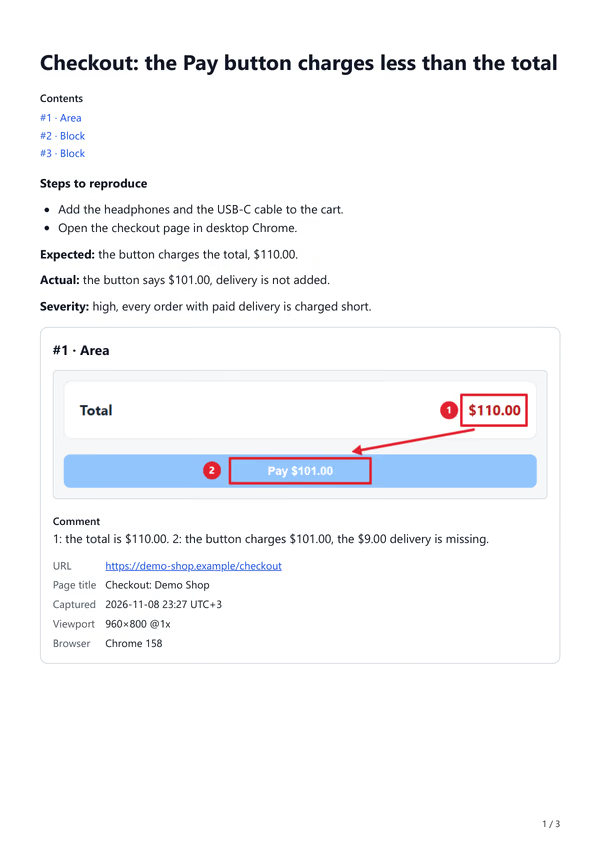
Title: <where> + <what is wrong>, e.g. "Checkout: the Pay button charges less than the total"

Steps to reproduce
1. <first action, with the page address>
2. <next action>
3. <the action that shows the bug>

Expected result: <what should happen>
Actual result: <what happens instead>

Severity: blocker / high / medium / low, and why
Environment: browser and version, window size, account or test data used

Evidence
#1 Screenshot of the problem, marked up: 1 = <first point>, 2 = <second point>
#2 The broken element: selector, HTML, CSS rules that apply
#3 Anything related: console text, a second page, page data
What each field is for
| Field | Why the developer needs it |
|---|---|
| Title | Finds the bug in a list of fifty: page first, then the problem |
| Steps to reproduce | Gets the same state on their machine; one action per step |
| Expected and actual | Separates a bug from a misunderstanding of the spec |
| Severity | Decides what to fix first in this release |
| Environment | Explains "works for me": window size and Chrome version change layout |
| Marked-up screenshot | Shows the place at a glance; numbers on the image match the comment |
| HTML and CSS of the element | Points to the rule to change, with the file it comes from |
SiteAnnotation fills in the environment for you: every item keeps the page address and title, the capture time, the window size and the Chrome version, and prints them under the screenshot in every export.
How to make this report in SiteAnnotation
- Capture the problem. Open the side panel and choose Area to drag around the place, or Block to click the broken element and save it with its HTML and CSS rules. Add a comment and press Add to report.
- Mark it up. Open the report and press Mark up image under the screenshot. Draw boxes, an arrow and numbered badges, and blur anything private. Screenshot annotation keeps every mark as a separate layer.
- Write the text. Give the report a title, paste the template into the introduction and fill in the steps, the expected and the actual result. Put the most important item first with the arrows.
- Export. Download PDF for people, Word if the client edits reports, HTML or Markdown for a tracker or a repository. Item numbers (#1, #2) are the same in every format. How export works.
Limits
- SiteAnnotation does not send reports anywhere: there is no Jira or GitHub integration. Attach the PDF or paste the Markdown into the issue.
- Console errors and network requests are not captured. Copy them from DevTools into the comment if they matter.
- A report keeps what you captured. If the bug needs a video of several steps, record it separately and link it in the introduction.